

 Jinba Flow
 Jinba App
 Jinba Toolbox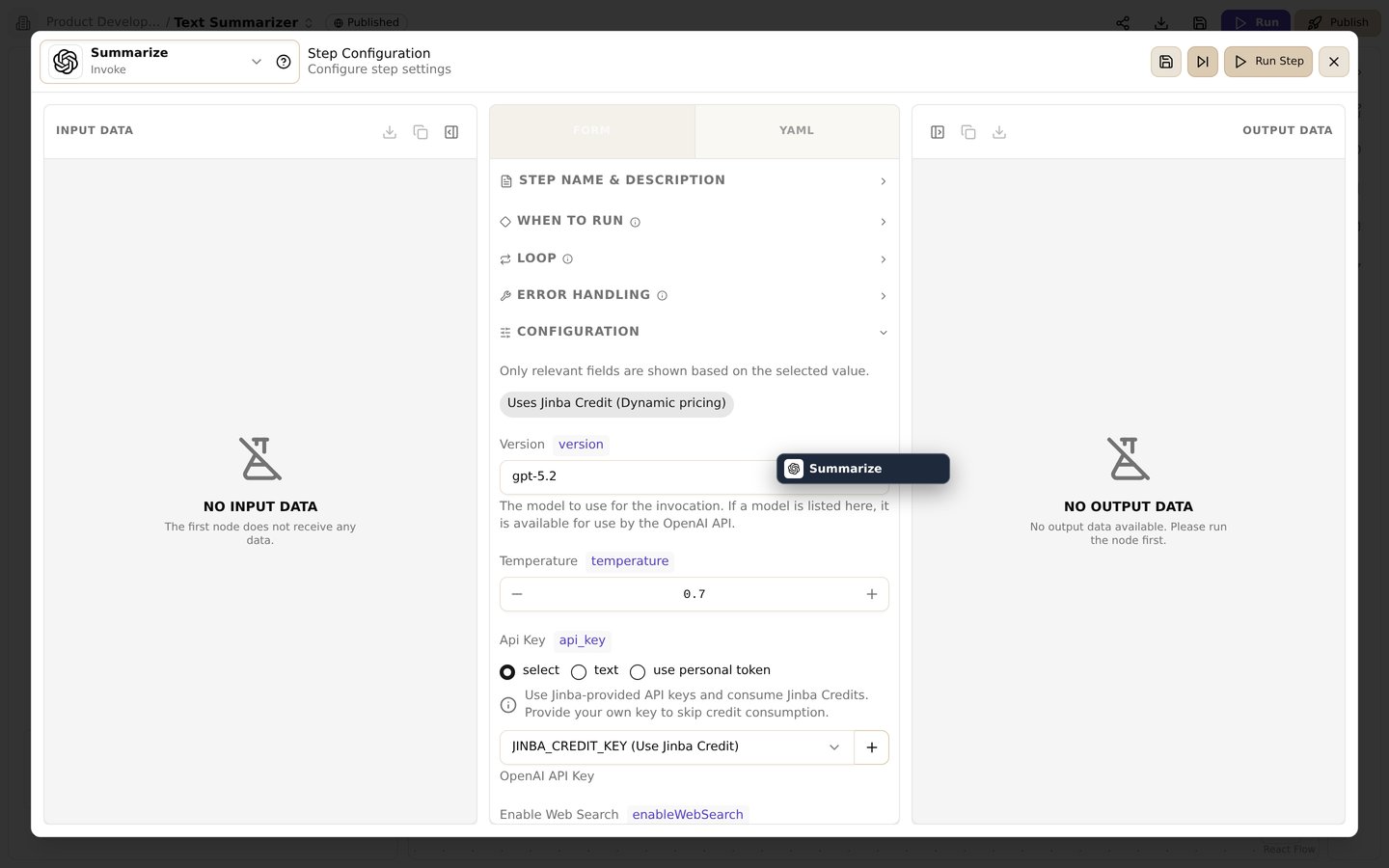
The step settings screen. Switch between form/YAML, configure run conditions, loops, and error handling, and inspect input/output data
Overview
Each step in a Jinba Flow can be configured with advanced options that control how and when it executes. These options allow you to create sophisticated workflows with conditional logic, loops, and complex dependencies.Step Dependencies (needs)
Theneeds option specifies which steps must complete before the current step can run. This creates an execution order and ensures data is available when needed.
Basic Usage
Key Points
- Execution Order: Steps with
needswait for all specified dependencies to complete - Parallel Execution: Steps without dependencies run in parallel automatically
- Failure Handling: If a dependency fails or is skipped, dependent steps are also skipped
- Diamond Patterns: Complex dependency graphs are supported (A→B, A→C, B→D, C→D)
Example: Multi-Branch Workflow
Conditional Execution (when)
Thewhen option allows a step to execute only if a specified condition is true. This enables dynamic workflow behavior based on previous step results.
Basic Syntax
Condition Expressions
Conditions support:- String Comparison:
"{{steps.check.result.status}}" == "success" - Numeric Comparison:
{{steps.count.result}} > 5 - Boolean Evaluation:
{{steps.validate.result.isValid}} == true
Example: Conditional Branching
Important Notes
- Conditions are evaluated before step execution
- If the condition is false, the step status becomes
skipped - Skipped steps don’t affect downstream steps that depend on them (they will also be skipped)
- Use single quotes around template variables in string comparisons
Loop Execution (forEach)
TheforEach option executes a step multiple times, once for each item in a collection. This is useful for batch processing lists of data.
Basic Syntax
How It Works
- The
forEachvalue is evaluated to get a list/array - The step executes once for each item in the list
- Inside the step,
{{item}}refers to the current item - Results are collected as an array
Example: Processing Multiple Items
Accessing Item Properties
forEach with Index
If you need the index of the current item, you can use Jinja2 loops in the input:Combining Options
You can combineneeds, when, and forEach in a single step:
- Wait for all
needsdependencies to complete - Check if
whencondition is true - If true, execute
forEachloop (or single execution if no forEach)
Best Practices
Dependencies
- Keep dependency chains shallow when possible
- Use parallel execution to improve performance
- Clearly name steps to make dependencies readable
Conditions
- Use meaningful condition expressions
- Consider all possible outcomes (success, failure, edge cases)
- Test conditions with various input values
Loops
- Limit loop iterations to avoid long execution times
- Handle empty arrays gracefully
- Consider memory usage for large datasets
Related
- YAML Coding Panel - Complete YAML syntax reference
- Variables & Templates - Variable placeholders and Jinja2 templates
- Debug - Debugging workflow execution