

 Jinba Flow
 Jinba App
 Jinba Toolbox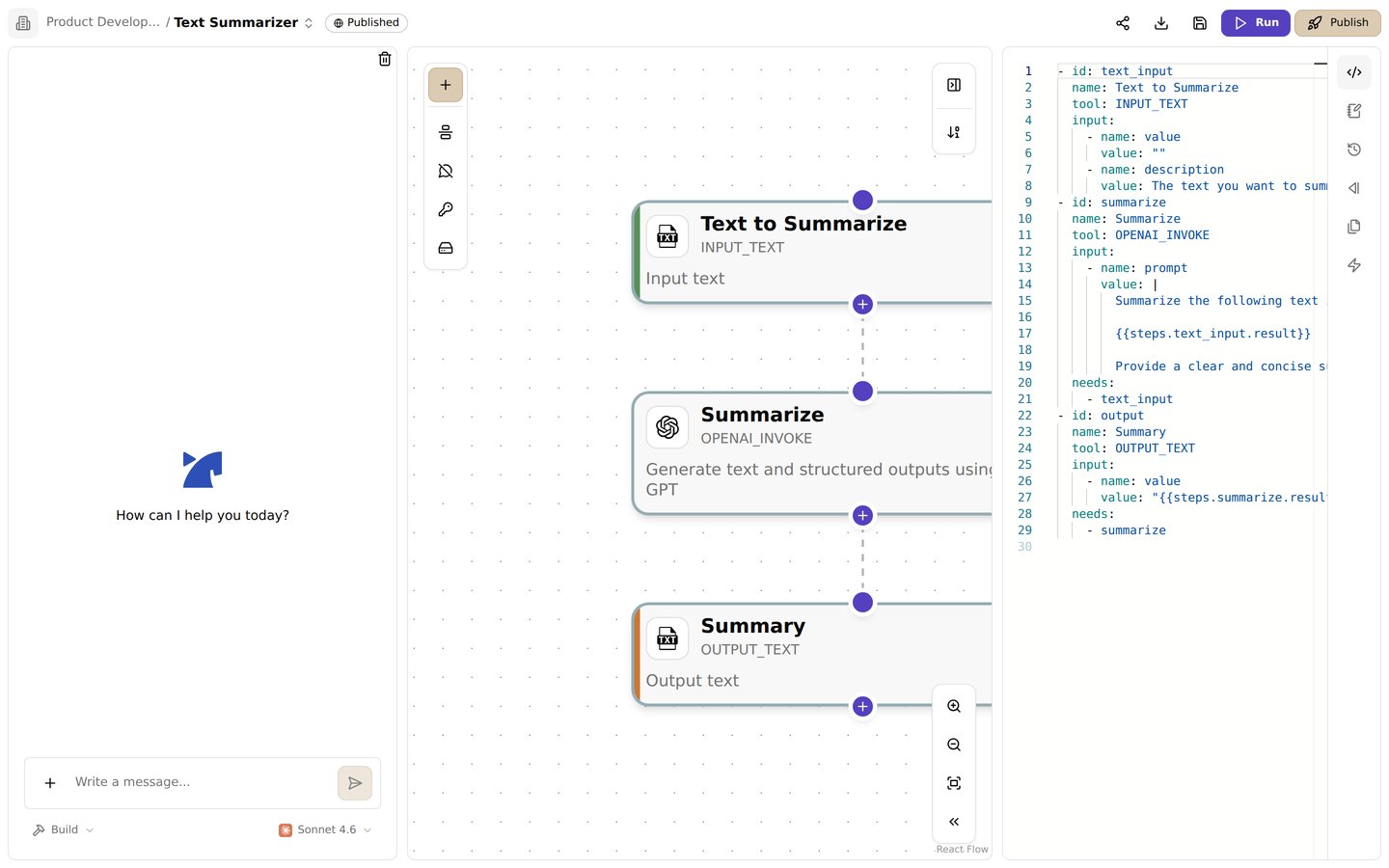
The code panel. Edit the entire flow directly as a YAML manifest
How It Works
Direct coding creation gives you complete control over your flows by writing YAML manifests directly. This method offers:- Full control over every aspect of your flow
- Ability to create complex workflows
- Integration with custom tools and APIs
- Precise control over execution order and conditions
- Advanced features like conditional execution and loops
Writing Your Own Manifest
To create a manifest:- Define an
idandnamefor each step. - Choose the appropriate
tool, such asINPUT_JSONorPYTHON_SANDBOX. - Specify input values under
input. - List dependencies using
needsto ensure correct execution order.
Step Components
Each step in a Jinba Flow manifest is composed of several key components that define its behavior and relationship with other steps. Here’s a detailed breakdown:1. Basic Step Structure
id: Required unique identifier for referencing the steptool: Required name of the tool to execute (must be one of the available tools)input: Required list of input parameters specific to the toolconfig: Optional tool-specific configuration (e.g., API tokens, temperature for LLM)needs: Optional list of step IDs that must complete before this step runswhen: Optional condition that must evaluate to true for the step to executeforEach: Optional field to execute the step multiple times over a collection
2. Configuration
Used to set tool-specific settings:3. Dependencies
Specify which steps must complete before this step can run:4. Conditional Execution
Control whether a step should run based on conditions:5. Loop Execution
Execute a step for each item in a collection:6. Result Reference
Reference results from previous steps:Important Notes
- Step IDs: Must be unique within the workflow
- Dependencies:
- Create an implicit execution order
- Can form complex graphs (including diamond patterns)
- Circular dependencies are not allowed
- Conditions:
- Support basic comparisons and logical operators
- Can reference results from previous steps
- Evaluated before step execution
- Variable References:
- Use
{{steps.step_id.result}}to access previous step results - Use
{{secrets.SECRET_NAME}}to access configured secrets - Use
{{item}}in forEach loops to access the current item
- Use
- YAML Syntax:
- Use
|for a multi-line string until the indentation ends.
- Use
Jinja2 Template Syntax
Jinba Flow supports Jinja2 templating for dynamic value generation and complex logic in manifest files. This powerful feature allows you to create more flexible and reusable workflows. When using templates, you have access to:steps: Results from previous stepsitem: Current item in forEach loopssecrets: Configured secrets- Built-in functions like
zip(),range(), etc.
{%- and -%} to control whitespace in the output, where the - removes whitespace before or after the block.
Basic Syntax
- Variable Interpolation
- Control Structures
- Accessing Step Results
Common Use Cases
- Processing Lists
- Conditional Logic
- Combining Multiple Lists
Common Patterns
- Filtering Lists
- Setting Default Values
- String Manipulation
Example Manifest
Below is an example manifest that processes numerical data through multiple steps:Breakdown of Each Step
1. Input Data (input_data)
- Uses the
INPUT_JSONtool to define an array of numbers[1, 2, 3, 4, 5].
2. Branch A1 (branch_a1)
- Uses
PYTHON_SANDBOXto compute the sum of even numbers frominput_data. - Depends on
input_data.
3. Branch A2 (branch_a2)
- Doubles the result from
branch_a1. - Depends on
branch_a1.
4. Branch B1 (branch_b1)
- Computes the sum of odd numbers from
input_data. - Depends on
input_data.